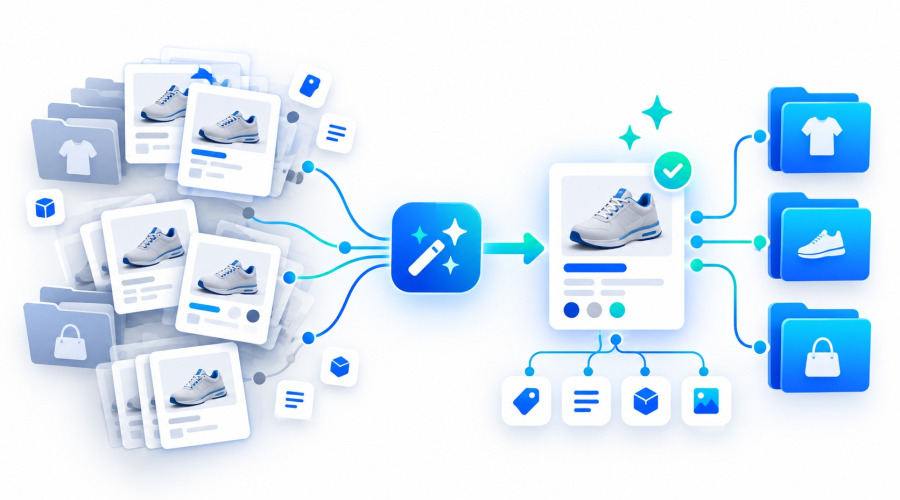





Catalog disorder rarely appears overnight. In most stores, it builds up gradually: products are imported from different suppliers, category names change, new features are created manually, and the same information starts appearing in several slightly different forms.
Over time, a PrestaShop catalog may contain entries such as “Color”, “color”, “Product color” and “Main color”, several nearly identical categories, or repeated attribute values.
In a small store, this may look like a cosmetic issue. In a catalog with thousands of products, the consequences become much more serious: filtering gets harder to maintain, imports become less predictable, the Back Office becomes more difficult to manage, and future automation depends on inconsistent catalog data.
Let’s look at why duplicates appear and how to clean up a PrestaShop catalog without manually editing every product.
Why duplicates appear in PrestaShop
One of the most common causes is product import.
Imagine that one supplier uses the feature:
Material
Another supplier sends:
Product material
And a third one sends:
material
For a person, the meaning is obvious. For automated processing, these may be treated as three different entities.
The same happens with attributes:
Color
Product color
Main color
And with categories:
Smartphones
Mobile phones
Smartphones and phones
This is not always caused by a bad import configuration. Different suppliers often use genuinely different data structures, and the store has to decide which entities should be treated as equivalent inside its own catalog.
With regular synchronization, the issue grows over time. We have already covered why a supplier feed structure should be kept separate from the internal store structure in our article about XML and YML catalog imports.
Why simply deleting a duplicate is not enough
In PrestaShop, a category, feature or attribute is not just a text label.
It may be connected to products, combinations, Multistore shops, language data, filters and other catalog elements.
That means the approach “keep the correct one and delete the others” can break relationships.
For example, suppose there are two features:
Material — used by 800 products.
Product material — used by another 350 products.
Deleting the second feature does not solve the problem. Its values and product relationships first need to be transferred to the feature that should remain.
Categories are even more complex because you may also need to preserve subcategories and default product categories.
Proper catalog cleanup is therefore not simple deletion. It is entity merging with safe transfer of related data.
First, you need to find potential duplicates
In a large catalog, manually reviewing thousands of categories, features and values is not realistic.
Potential duplicates are easier to detect by similarity.
For example:
Red
red
Red color
or:
Diameter
Product diameter
However, similar wording does not automatically mean that two entities should be merged. Duplicate detection should help identify candidates, while the final decision should remain with the administrator.
This matters because some similar-looking features have different meanings.
For example, “Length” and “Cable length” may be similar in wording but should not be merged.
How categories should be merged
Categories require special handling.
Suppose the catalog contains:
Computers
Computer equipment
PCs and computers
If the decision is made to keep a single category, products from the others need to be moved into it.
But that is only part of the job.
Default product categories, child categories and the category tree also need to be checked.
The goal is to end up with one clean catalog branch instead of several parallel sections containing the same or similar products.
This is important not only for administration. Category structure is also directly related to store navigation and SEO because categories are often used as standalone landing pages.
For that reason, mass category merging should be performed in a controlled way rather than through direct SQL changes.
Features and feature values
Features need to be handled at two levels.
The first level is the feature itself:
Material
Body material
The second level is its values:
Cotton
cotton
100% cotton
Sometimes only the values need to be merged. In other cases, entire features need to be consolidated.
In both cases, product relationships must be preserved.
After cleanup, the catalog contains one consistent structure instead of several nearly identical variants, which makes product pages, filtering and future imports easier to manage.
Attributes require combination conflict checks
In PrestaShop, attributes are used to create product combinations, so they cannot be processed in the same way as ordinary features.
For example, a product may have:
Size: M
Color: Black
If two attribute values are merged and this creates two identical product combinations, simply replacing IDs can result in a conflict.
That is why future product combinations should be checked before attribute values are merged.
This is one of the main reasons why mass attribute cleanup directly in the database is especially risky.
Cleaning the catalog once is not enough
Suppose the catalog has already been cleaned up.
A week later, the next supplier import sends:
Product color
while the store already uses:
Color
If the importer does not know that these names are equivalent, the duplicate will appear again.
That is where data normalization becomes important.
The administrator can approve a mapping once:
Product color → Color
This rule can then be reused during future imports.
The same approach works with features and attribute values.
Instead of repeatedly fixing the same problem, the store gradually builds its own mapping dictionary for incoming supplier data.
This is especially important with multiple suppliers
The more data sources a store uses, the higher the chance that the same concept will be described in several different ways.
One supplier may send:
Length
another:
Length, cm
another:
Product length
and another:
Item length
Copying the structure of every supplier directly into PrestaShop is not a good long-term strategy.
The store should maintain its own consistent catalog structure, while incoming data should be mapped to that structure.
This is especially useful for stores that regularly update XML or YML feeds from multiple suppliers.
What to do with duplicates that have already accumulated
For a small catalog, part of this work can still be done manually.
For stores with thousands of products and hundreds of features, however, a dedicated tool is much more practical because it can understand relationships between PrestaShop entities.
For this task, Ewonta offers the Feature, Attribute and Category Manager module.
It is designed specifically for cleaning up an existing catalog: finding potential duplicates, merging categories, features and attributes, checking combination conflicts and saving normalization rules for future imports.
Feature, Attribute and Category Manager for PrestaShop →
For large operations, recovery matters as well. That is why changes should be performed in a controlled way, with operation history, conflict tracking and snapshots that make recovery safer if something goes wrong.
How to avoid repeating the same cleanup every few months
The best result comes when cleanup and import normalization work together.
First, the existing catalog is brought into a consistent structure: real duplicates are merged and the main categories, features and attributes are defined.
Then the approved mappings are reused during future imports.
The workflow becomes:
find duplicate → review → merge → save mapping → prevent the duplicate from being created again
This changes catalog maintenance from reactive cleanup into a more stable and predictable process.
A clean catalog is part of the store architecture
Duplicate categories and features rarely cause major problems the moment they appear.
The real issues become visible later, when the catalog grows, another supplier is added, new languages are introduced, filters become more complex, and automated imports are expanded.
That is why catalog normalization is more than cosmetic cleanup in the Back Office.
Well-structured categories, features and attributes create a predictable foundation for imports, search, filtering and future store development.
The earlier a store defines its own catalog structure, the less manual cleanup it will need as the assortment grows.
Module >